Enjoy going out.
Know what’s left.
Coffee catch-ups, dinner, and nights out. Track what you spend and see what remains in your monthly dining budget. When friends share the cost, use the free bill splitter to work out who owes whom.
Split bills in your browser. No app or account needed.
iPhone / iOS 17 or later. Free app includes ads and optional in-app purchases.
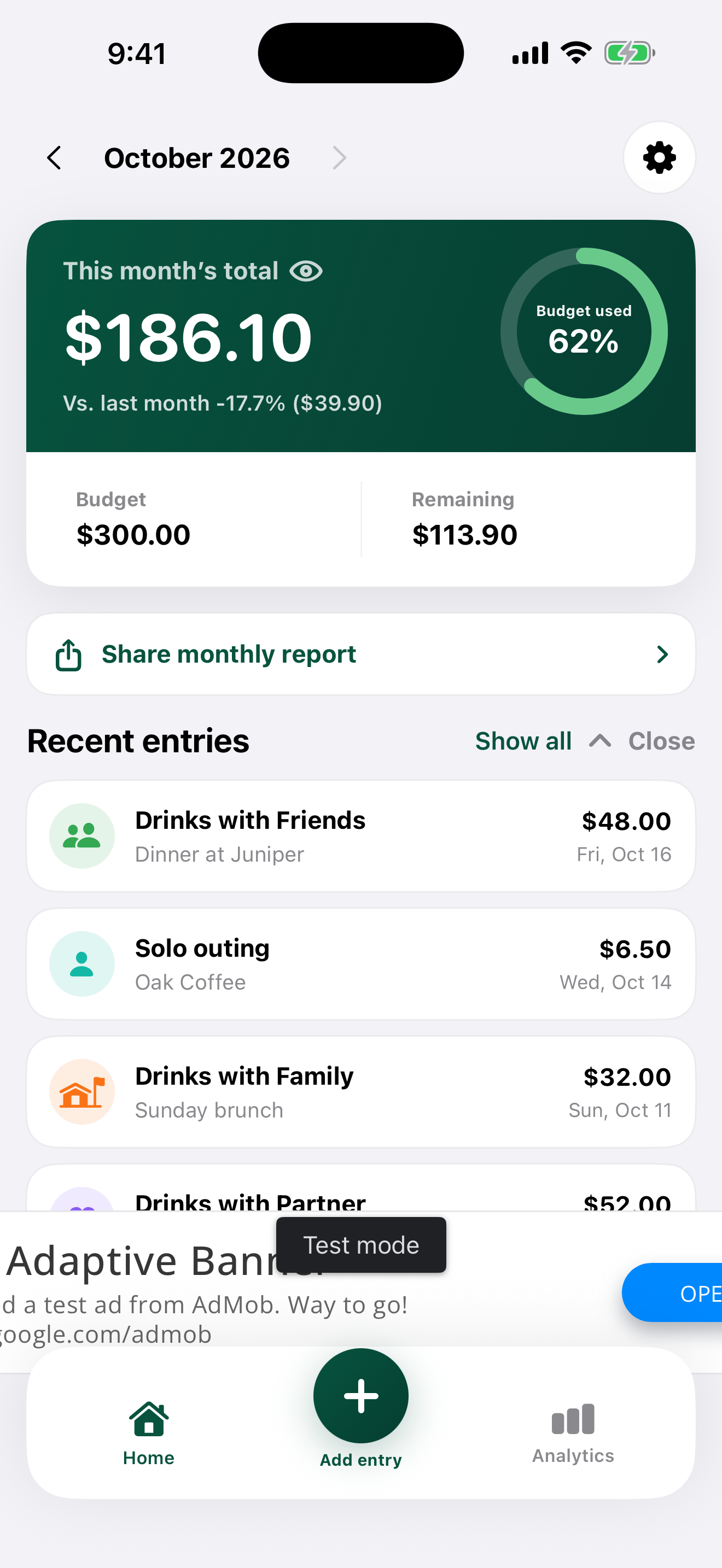
Start with your next meal.
See where your money goes.
More than a number.
Record the amount, date, place, who you were with, occasion, rating, and a note. Manual entries are free and unlimited. No sign-up or bank connection required.
Know what’s left for your next night out.
Set a monthly dining budget and see what you have spent and what remains. Keep records and budgets separately in USD, EUR, GBP, and other currencies. NOMICA does not convert between currencies.
Remember the experience, too.
Compare this month with last month and explore patterns by day of the week. Use your ratings and notes to plan your next outing. Premium adds longer-term trends and more detailed breakdowns.
Dinner, then coffee.
One clear split.
Add who paid and who shares each cost to calculate who owes whom. Share a link so friends can view and edit the group right in their browser.
01 / ADD THE GROUP’S EXPENSES
Create a group, choose a currency, and add your friends. For each expense, enter the amount, who paid, and who shares the cost.
02 / SHARE THE LINK
Friends can join without downloading an app or creating an account. NOMICA calculates the amounts owed; payments happen separately.
03 / LOG YOUR OWN SHARE
Want to track your dining budget, too? Enter your share manually in the iPhone app. Shared expenses do not automatically update your personal budget.
Anyone with the link can view and edit. Share it only with people you trust.
Make a habit of logging.
Explore more with Premium.
Free
- Unlimited manual expense entries
- This month’s and last month’s records and totals
- Monthly budget and remaining amount
- A notification when spending reaches 50% of your budget
- Banner ads in the app
NOMICA Premium
- Up to 50 AI receipt scans per calendar month
- Access to all past months
- Six-month and annual spending trends
- Breakdowns by occasion and who you were with, plus budget pace estimates
- An ad-free experience
Premium is an optional monthly subscription that renews automatically. See the current price before purchasing in the app. Manage or cancel your subscription in your App Store account settings.
Find your first step.
Budget for dining out and coffee
Choose what to track, set your monthly budget, and see what remains.
Read the guide →NIGHTS OUTKeep track of the cost of going out
Record your own share and remember the experiences behind your spending.
Read the guide →SHARED MEALSDinner and coffee with three friends
See who owes whom when different people cover the bills.
Read the guide →Before you start.
Do my friends need to download NOMICA?
No. Friends can view and edit a shared group using its link in their browser. No app or account is needed. The iPhone app is available if they want to track their own dining budget.
Do shared bills automatically update my personal budget?
No. Shared group expenses and personal expense records are separate. Enter your own share manually to include it in your dining budget. NOMICA does not transfer money.
Do I need to connect my bank?
No. You can start logging expenses without connecting a bank account or creating an account. Start with the spending you want to understand, such as restaurants and coffee shops.
Is AI receipt scanning free?
AI receipt scanning requires Premium and includes up to 50 scans per calendar month. The limit resets at the start of each month in Japan time. With your consent, your selected receipt image and recognized text are sent to NOMICA’s server on Cloudflare and to OpenAI to extract the merchant and total. Check and edit the result before saving.
Which languages and currencies are supported?
The app supports Japanese, English, Simplified and Traditional Chinese, Korean, and French, following your iOS language settings. Select your currency in the app. Records, totals, and budgets are kept separately by currency; there is no currency conversion.
How is my data handled?
Personal expense records are stored on your device. Shared groups are stored on NOMICA’s server. Some features send data to external services, including AI scanning, ads in the free app, and optional usage statistics. Usage statistics are off by default.
Make your next shared bill simple.
Start with free bill splitting. Track your own dining budget in the app.